FREE, OPEN-SOURCE PARAMETRIC CAD

SolidCraft Online.
Free parametric
3D CAD.

Sketch, constrain and build 3D parts in your browser. Start with an editable example or create your first model. No installation. No signup.

Free & open-source No account needed

An independent community lab. Not affiliated with the SolidCraft project.

+
Designed here.Saved on your device.
A LITTLE IDEA, TAKING SHAPESOLIDCRAFT / v0.15.0
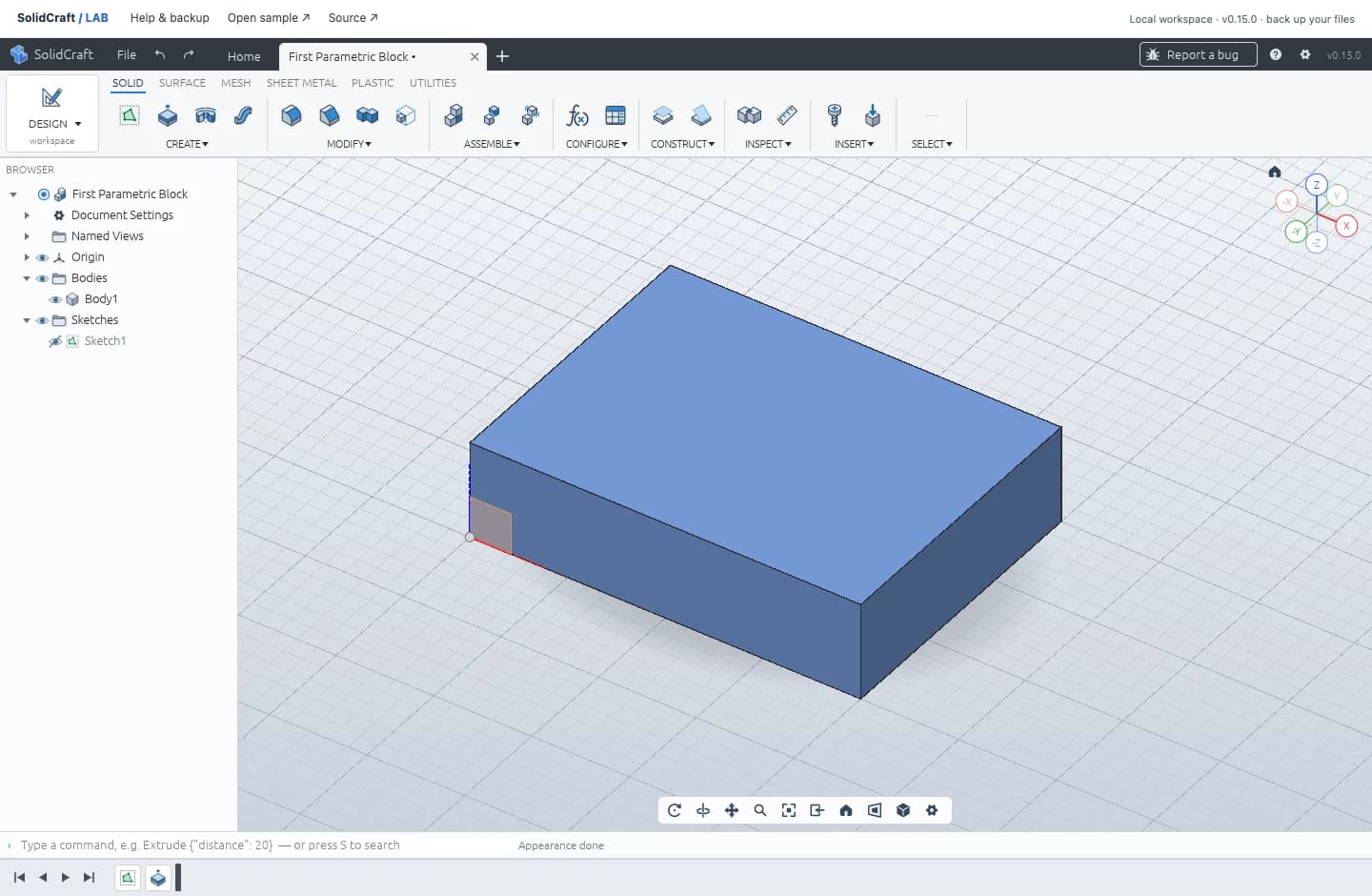
Real SolidCraft browser editor running a fully constrained 40 by 30 by 10 millimeter parametric block
FIRST PARAMETRIC BLOCK ACTUAL WORKSPACE CAPTURE
START SMALL.40 × 30 × 10 mm
+SKETCH → CONSTRAIN → CREATE
LESS SETUP. MORE MAKING. Open-source by design Rust + WebAssembly Your files stay local Desktop recommended
FROM A SKETCH TO A USEFUL PART

What is SolidCraft Online?

SolidCraft is free, open-source parametric 3D CAD software. Its browser edition brings a sketch-and-feature modeling workflow to a web workspace: define a profile, constrain its geometry, and build a solid with dimensions you can revisit. You can try the workflow without installing a desktop application.

SolidCraft Lab hosts the upstream web editor alongside beginner lessons and downloadable native examples. It is a place to try a small part, understand how it was constructed, and keep an editable copy. Students, makers and people exploring parametric CAD can begin with the same two verified exercises shown below.

This independent site uses the v0.15.0 web release. The official SolidCraft repository is the source for the software, licenses and development history. Lab adds the guided entry points; the modeling tools come from SolidCraft.

THE CORE MODELING TOOLS

What can you build with SolidCraft CAD?

Start with measured mechanical shapes. The examples connect each tool to a result you can inspect and change.

01

Dimensioned sketches

Start with a two-dimensional profile. Use dimensions to specify sizes and constraints to describe how lines and curves relate. A fully constrained sketch has no remaining freedom to move. That makes a rectangle a useful first exercise: its width and height become explicit design decisions instead of approximate mouse movements.

Learn the sketch workflow
02

Parametric solid modeling

Extrude a closed sketch into a solid, then return to its driving dimensions when the part needs to change. The feature timeline records the construction steps. This approach suits parts whose measurements matter, such as blocks, plates and simple fixtures, because you can revise the dimensions without drawing the starting profile again.

See a parametric part
03

A browser-based CAD workspace

SolidCraft Web runs its CAD engine locally through WebAssembly. Sketching and modeling happen on your device, with browser storage for saved designs. Use a desktop browser and a mouse for the workspace; the tutorials and example previews remain readable on a phone. The editor starts only when you choose to launch it.

Open SolidCraft Web
A FIRST SESSION, IN THREE STEPS

How to use SolidCraft in your browser

You can start from an existing part or follow the first-part guide with the editor open beside it.

Open a design or an example

Visit the online CAD launcher and choose a blank workspace or a sample. An example gives you an existing sketch and solid to inspect before creating your own. Allow the editor assets to load, then locate the feature tree, sketch tools and three-dimensional viewport.

Sketch, constrain and extrude

For the first-part exercise, draw a rectangle, set its dimensions to 40 × 30 mm, and extrude it by 10 mm. Check the resulting shape from more than one angle. Follow the SolidCraft beginner tutorial for screenshots, the expected result and help with an unfinished sketch.

Save an editable design

Save your work in the editor, then keep a separate native backup. Open File → Open… and choose Download open design in the file panel. The downloaded .solidcraft file is the copy you can move to another browser or computer and reopen for further editing.

SMALL PARTS. REAL DESIGN FILES.

SolidCraft examples you can open and edit

Browse the example library

Both examples include an actual editor capture, dimensions and a native .solidcraft file. Choose “Open in CAD” to load a sample, or visit its detail page to download the file and review the construction steps. You can inspect the original before making changes.

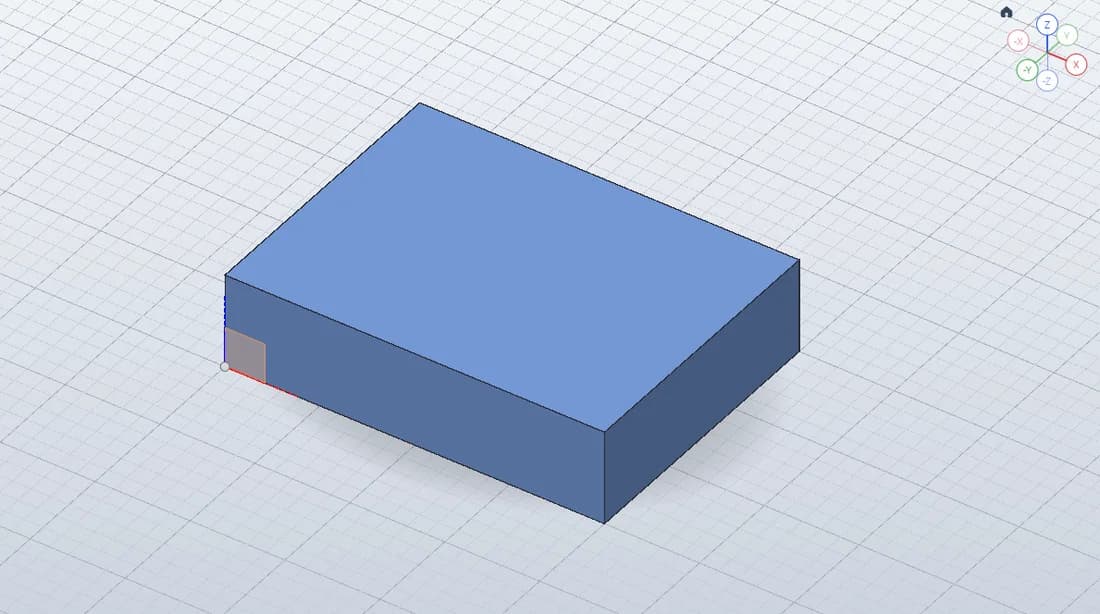
THE ESSENTIALSActual SolidCraft model of First Parametric Block, 40 × 30 × 10 mmPART / 01

Build a 40 × 30 × 10 mm block from a fully constrained rectangle and one extrusion. Open the sketch to see how two dimensions control the footprint, then change the width and rebuild. This is the shorter exercise for learning the relationship between a sketch, a feature and the final solid.

40 × 30 × 10 mm
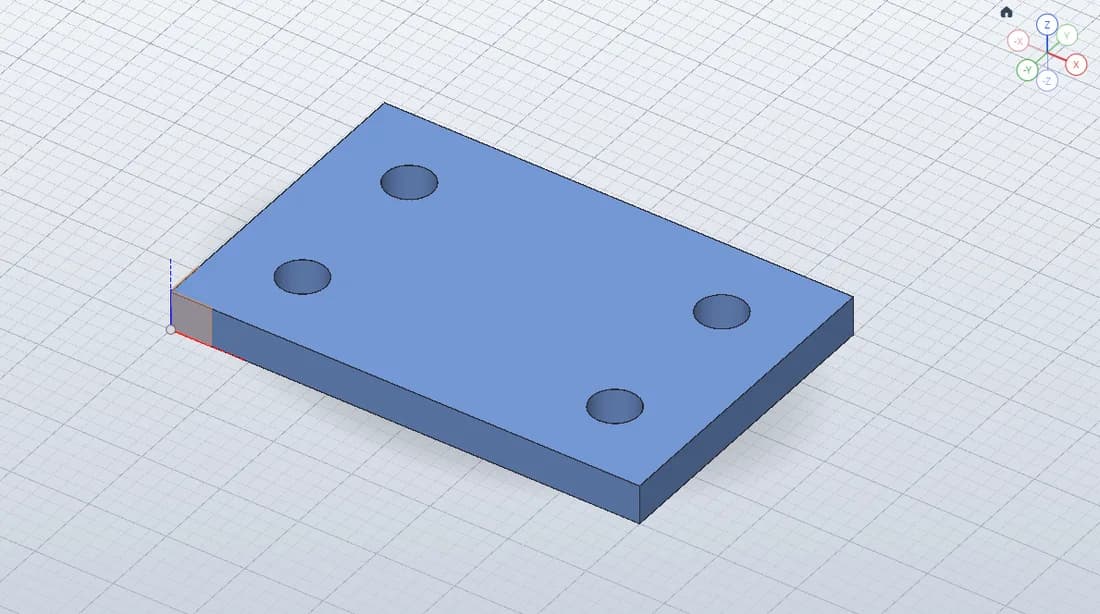
A PRACTICAL NEXT STEPActual SolidCraft model of Mounting Plate, 60 × 40 × 5 mm · Ø6 mm holesPART / 02

Explore a 60 × 40 × 5 mm plate with four Ø6 mm through-holes. The rectangular boundary and circular profiles produce a practical next exercise after the block. Inspect the sketch and the resulting holes, then use the native design as a starting point for experimenting with your own plate dimensions.

60 × 40 × 5 mm · Ø6 mm holes
CHECKED IN THE BROWSER EDITOR

The block was measured at 12,000 mm³. Changing its width from 40 to 50 mm rebuilt it to 15,000 mm³, and undo restored the original. We also downloaded and reopened the native file and checked recovery after a browser reload. These checks connect the sample images to working, editable geometry.

Inspect the block and its dimensions
KEEP THE DESIGN, THEN SHARE THE GEOMETRY

Saving SolidCraft designs and exporting files

Choose a format according to what you want to do next: return to the design, move it, or use its geometry elsewhere.

Browser saves normally use the Origin Private File System (OPFS), with local storage as a fallback when OPFS is unavailable. They belong to the browser profile and the editor’s website origin, so another device or a different domain will not automatically show them. Download a native backup before clearing site data or moving your work. To reopen it, choose Open from computer… in the same file panel.

Keep the .solidcraft file when you want to edit sketches and the feature history later. Use geometry exports for a different CAD or manufacturing workflow: STEP carries CAD geometry, while STL carries a triangle mesh commonly used by slicers. Neither is a replacement for your native design backup.

The upstream file-format guide describes the supported imports and exports. Check the exported model’s dimensions and units in the receiving application before using it.

Which copy should you keep?
Storage or formatBest used for
Browser saveBrowser storage · this profile and originReopening a local design in the same workspace.
.solidcraftNative, editable design fileBacking up the model and continuing its parametric history.
STEP / STLCAD geometry / triangle meshMoving geometry into another application or a slicer.
CHOOSE YOUR WORKSPACE

SolidCraft Online or a desktop download?

Choose the online editor for a first look, a tutorial session or a quick experiment without installation. A desktop browser with hardware acceleration is recommended. The launcher includes a WebGL2 fallback and an official alternative if the editor cannot start on your setup.

Choose the desktop application if you prefer an installed workspace or want to explore the upstream command-line and MCP tools. Our SolidCraft download page points to official releases for Windows, macOS and Linux. Check the release notes and select the package for your operating system and architecture.

The upstream MCP server lets compatible agents work with CAD commands. That is a separate setup described in the official MCP documentation; this online workspace does not include a hosted AI agent. For ordinary sketching and modeling here, you need no paid AI API.

OFFICIAL DESKTOP RELEASES

Already working in the browser? Download your native design before moving to another workspace.

BEFORE YOU START

SolidCraft Online: frequently asked questions

Practical answers about access, browser support and ownership of your designs.

Is SolidCraft free?

Yes. The upstream SolidCraft project is open-source under MIT or Apache-2.0. This community workspace is free to use, with no subscription or paid AI API required.

Can SolidCraft run in my browser?

Yes. SolidCraft has a WebAssembly application that runs its CAD engine in your browser. This site serves the pinned v0.15.0 web release. A desktop browser with WebGPU or WebGL2 and hardware acceleration is recommended.

Do I need an account?

No. Open the workspace and start designing. SolidCraft Lab does not require a login and does not provide a cloud account or cloud backup.

Where are my designs saved?

The web editor normally saves designs in your browser’s Origin Private File System (OPFS), with local storage as a fallback when OPFS is unavailable. Storage belongs to this browser profile and origin. Clearing site data or ending a private-browsing session can remove it; another device cannot access it automatically. Use File → Open… → Download open design to keep an editable .solidcraft backup on your computer.

Is SolidCraft Lab the official website?

No. SolidCraft Lab is an independent community workspace and learning hub. It is not affiliated with or endorsed by the SolidCraft project. The official source is tangency-labs/solidcraft on GitHub.

THE BEST WAY TO LEARN IS TO MAKE.

Give your first idea a shape.

Open the editor, try a real example, and keep what you create.

Open the workspace FREE TO USE. NO ACCOUNT. JUST YOUR CURIOSITY.